
For astronomy laptops with high battery life, I’d start with the Samsung Galaxy Book4 Edge: its Snapdragon X platform and 16GB of RAM make it a strong all-around choice for charting and observing away from an outlet. The HP OmniBook 3 14-inch 2K Touch models offer compact screens and the same processor family, while the LG Gram Book 16 is the larger-screen option for comparing charts and imaging data. The tradeoff is between portability and display space, with storage capacity and real-world battery life also shaping the choice. Battery life varies with screen brightness, connected devices, and workload, so advertised runtime is only a starting point. Read on for how each pick fits different observing setups and where its compromises matter.

Get sports gear delivered free with Prime
- Fast, free delivery on millions of items
- Prime Video, Amazon Music and more included
- Member-only deals all year
Complete the kit


Key Takeaways
- The Samsung Galaxy Book4 Edge is the clearest all-around fit on listed specs: Snapdragon X, 16GB RAM, and 512GB storage combine portability with room for astronomy apps and data.
- The three HP OmniBook 3 configurations are close alternatives, not three distinct performance tiers. Compare screen type and storage carefully; two listings specify a 512GB SSD, while the OLED configuration lists 256GB.
- The Lenovo IdeaPad Slim 3i is the only listing with a stated battery estimate—up to 12 hours—but its 8GB RAM and 128GB storage limit headroom for heavier workflows.
- The LG Gram Book 16 favors viewing space, which can make charts and image work easier to see, but its larger display may draw more power than a compact model.
- Several listings do not provide enough detail to rank battery life confidently. The GEEKOM GeekBook M16 and some other models need verified runtime and configuration information before buyers can compare them fairly.
| Lenovo 2026 Model 15.6” FHD IdeaPad Slim 3i Rugged Reliability Laptop | 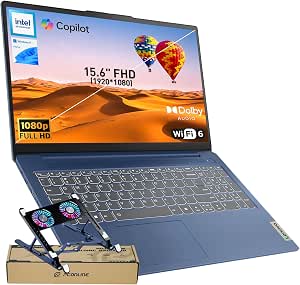 | Best Rugged, Budget-Conscious Pick | Display: 15.6-inch LCD, 1920 x 1080, 300 nits | Processor: Intel N150, 4-core | Memory: 8GB DDR5 | VIEW ON AMAZON | See Our Full Breakdown |
| Samsung Galaxy Book4 Edge Laptop, 15.6-inch FHD IPS, Snapdragon X, 16GB RAM, 512GB Storage |  | Best Large-Screen Battery Pick | Display: 15.6-inch FHD IPS anti-glare LED | Processor: Qualcomm Snapdragon X | Memory: 16GB LPDDR5X, 8448MHz | VIEW ON AMAZON | See Our Full Breakdown |
| HP OmniBook 3 14-inch 2K Touch Laptop with Snapdragon X Processor, 16GB RAM, 512GB SSD |  | Best Balanced Compact Pick | Display: 14-inch IPS touchscreen, 1920 x 1200 | Processor: Snapdragon X1-26-100, 8-core | NPU: 45 TOPS | VIEW ON AMAZON | See Our Full Breakdown |
| HP OmniBook 3 14-inch Next Gen AI PC, 2K OLED Display, Snapdragon X1-26-100, 16GB RAM, 256GB SSD |  | Best for Maximum Claimed Battery Life | Display: 14-inch 2K OLED, 1920 x 1200 | Processor: Snapdragon X1-26-100, 8 cores, up to 2.97GHz | Memory: 16GB LPDDR5x | VIEW ON AMAZON | See Our Full Breakdown |
| HP OmniBook 3 14-inch 2K Touchscreen Laptop with Snapdragon X Processor, 16GB RAM, 512GB SSD |  | Best Touchscreen Value | Display: 14-inch touchscreen, 1920 x 1200 | Processor: Snapdragon X1-26-100 | NPU: Qualcomm Hexagon, 45 TOPS | VIEW ON AMAZON | See Our Full Breakdown |
| GEEKOM GeekBook M16 Laptop |  | Best for High-Performance Astronomy Work | Processor: Intel Core Ultra 9 185H | Graphics: Intel Arc | Display: 16-inch IPS, 16:10 aspect ratio | VIEW ON AMAZON | See Our Full Breakdown |
| LG Gram Book 16 2026 Touch Laptop with AMD Ryzen AI 7 |  | Best Lightweight Long-Battery Pick | Processor: AMD Ryzen AI 7 | Graphics: AMD Radeon Graphics | Display: 16-inch WUXGA IPS touchscreen, 1920×1200, 120Hz | VIEW ON AMAZON | See Our Full Breakdown |
| astronomy laptops with high battery life | Display | Processor | Memory | Storage |
|---|---|---|---|---|
| Lenovo 2026 Model 15.6” FHD Id | 15.6-inch LCD, 1920 x 1080, 300 nits | Intel N150, 4-core | 8GB DDR5 | 128GB eMMC |
| Samsung Galaxy Book4 Edge Lapt | 15.6-inch FHD IPS anti-glare LED | Qualcomm Snapdragon X | 16GB LPDDR5X, 8448MHz | 512GB UFS |
| HP OmniBook 3 14-inch 2K Touch | 14-inch IPS touchscreen, 1920 x 1200 | Snapdragon X1-26-100, 8-core | 16GB LPDDR5x | 512GB PCIe Gen4 NVMe SSD |
| HP OmniBook 3 14-inch Next Gen | 14-inch 2K OLED, 1920 x 1200 | Snapdragon X1-26-100, 8 cores, up to 2.97GHz | 16GB LPDDR5x | 256GB PCIe NVMe M.2 SSD |
| HP OmniBook 3 14-inch 2K Touch | 14-inch touchscreen, 1920 x 1200 | Snapdragon X1-26-100 | 16GB | 512GB PCIe Gen4 NVMe M.2 SSD |
| GEEKOM GeekBook M16 Laptop | 16-inch IPS, 16:10 aspect ratio | Intel Core Ultra 9 185H | 16GB LPDDR5, 6400MHz | 512GB PCIe Gen4 SSD |
| LG Gram Book 16 2026 Touch Lap | 16-inch WUXGA IPS touchscreen, 1920×1200, 120Hz | AMD Ryzen AI 7 | 16GB LPDDR5X | 1TB SSD |
More Details on Our Top Picks
Lenovo 2026 Model 15.6” FHD IdeaPad Slim 3i Rugged Reliability Laptop
The IdeaPad Slim 3i is the practical choice for stargazers who want a laptop that can handle travel to observing sites without demanding a charger at every stop. Its stated up to 12-hour battery life trails the Galaxy Book4 Edge and HP OmniBook options, but the MIL-STD-810H durability rating and 3.42-pound build give it a different advantage: it is aimed at routine computing in a more travel-ready shell. The 15.6-inch screen and built-in SD reader are handy for checking charts and moving camera files, though the 300-nit LCD is less compelling for detailed image work than the OmniBook’s 2K displays. Its 128GB eMMC storage is a real constraint for astronomy image libraries, and the Intel N150 is suited to everyday tasks rather than heavy processing. Choose it for resilience and basic field use, not demanding astrophotography workflows.
Pros:- MIL-STD-810H-rated design suits frequent transport to observing locations.
- Stated battery life of up to 12 hours supports a day of light use away from an outlet.
- Built-in SD card reader helps transfer camera files without a separate reader.
- 15.6-inch FHD display offers a larger workspace than the 14-inch OmniBook models.
Cons:- 128GB eMMC storage leaves little room for extensive astronomy image libraries.
- Intel N150 and integrated graphics are not aimed at intensive image processing.
- Up to 12 hours is well below the stated battery claims for the Galaxy Book4 Edge and OmniBook alternatives.
Best for: Beginners and students who need a durable laptop for star charts, notes, and occasional observing trips, with modest local file-storage needs.
Not ideal for: Astrophotographers who plan to store large capture sessions locally or process images on the laptop; its 128GB eMMC storage and entry-level processor are limiting.
- Display:15.6-inch LCD, 1920 x 1080, 300 nits
- Processor:Intel N150, 4-core
- Memory:8GB DDR5
- Storage:128GB eMMC
- Battery life:Up to 12 hours
- Weight:3.42 lbs
- Durability:MIL-STD-810H
- Ports:USB-C, 2x USB-A, HDMI 1.4b, SD card reader, headphone/mic jack
Our verdict“Pick the IdeaPad Slim 3i for a rugged, basic observing companion, but choose an OmniBook or Galaxy Book if long unplugged sessions and image storage matter more.”
Samsung Galaxy Book4 Edge Laptop, 15.6-inch FHD IPS, Snapdragon X, 16GB RAM, 512GB Storage
For astronomy fans who want a roomy screen and fewer charging interruptions, the Galaxy Book4 Edge pairs a 15.6-inch FHD panel with a stated up to 28 hours of battery life. That claim sits below the HP OmniBook 3 OLED’s listed 41 hours 45 minutes, but the Samsung gives you 512GB of storage and 16GB of memory, a more comfortable starting point for charts, software, and a growing collection of captures than the IdeaPad Slim 3i’s 128GB. Wi-Fi 7 and USB4 add useful connectivity for modern accessories and fast external storage. The Snapdragon X platform and Adreno integrated graphics suit productivity, not graphics-heavy processing or gaming, and Windows app compatibility may matter for specialized astronomy tools. This is a strong fit for portable planning and general work, though the battery figure is a manufacturer claim rather than a guarantee under sustained screen or processing loads.
Pros:- Stated battery life of up to 28 hours supports extended light-use sessions away from an outlet.
- 512GB storage offers substantially more room than the IdeaPad Slim 3i’s 128GB eMMC.
- 15.6-inch FHD anti-glare IPS display provides a broad workspace for charts and desktop layouts.
- Wi-Fi 7 and USB4 expand wireless and wired connectivity options.
Cons:- Integrated Adreno graphics are not suited to demanding graphics workloads.
- Snapdragon-based Windows software compatibility should be checked for astronomy applications and accessories.
- Its stated battery life is shorter than the HP OmniBook 3 OLED’s listed claim.
Best for: Observers who want a larger 15.6-inch workspace, substantial built-in storage, and long claimed battery life for charting and general productivity away from power.
Not ideal for: Buyers who need a dedicated GPU, confirmed compatibility with specialized x86 astronomy software, or the longest stated battery life in this group.
- Display:15.6-inch FHD IPS anti-glare LED
- Processor:Qualcomm Snapdragon X
- Memory:16GB LPDDR5X, 8448MHz
- Storage:512GB UFS
- Graphics:Qualcomm Adreno integrated graphics
- Battery life:Up to 28 hours
- Connectivity:Wi-Fi 7, Bluetooth 5.4
- Ports:USB-C (USB4), USB-A, HDMI, 3.5mm audio jack
Our verdict“Choose the Galaxy Book4 Edge if you prefer a large screen and 512GB storage with long claimed runtime, but check astronomy software compatibility before buying.”
HP OmniBook 3 14-inch 2K Touch Laptop with Snapdragon X Processor, 16GB RAM, 512GB SSD
The HP OmniBook 3 balances portability, screen detail, and storage without leaning as hard on a headline battery claim as its OLED sibling. Its stated up to 30 hours of battery life is strong for a 14-inch laptop, while the 3.13-pound body is easier to pack than the 15.6-inch Galaxy Book4 Edge. The 1920 x 1200 touchscreen gives star charts and reference material a little more vertical room than standard FHD, and the 512GB PCIe SSD is a better base for image files than the IdeaPad Slim 3i’s eMMC storage. The listed 60Wh battery and fast SSD make this a well-rounded choice for portable planning and routine editing, though runtime will vary with workload. Its memory is soldered, and Snapdragon compatibility may need checking for specialist tools; the 41-hour-plus OLED model claims longer runtime but has less storage.
Pros:- Stated battery life of up to 30 hours is well above the IdeaPad Slim 3i’s 12-hour claim.
- 14-inch, 1920 x 1200 touchscreen adds vertical workspace in a compact 3.13-pound design.
- 512GB PCIe Gen4 NVMe SSD provides more responsive storage and room than the IdeaPad’s 128GB eMMC.
- HDMI 2.1 and two USB-C ports support flexible display and accessory connections.
Cons:- Soldered 16GB memory cannot be upgraded later.
- Integrated Adreno graphics are a poor fit for graphics-intensive workloads.
- Snapdragon Windows compatibility may limit some specialized astronomy software.
Best for: Mobile observers who want a compact 14-inch touchscreen, 512GB SSD, and a strong stated battery claim for charts, field notes, and everyday file handling.
Not ideal for: Buyers who need upgradeable memory, a dedicated graphics processor, or the longest listed battery claim available among these picks.
- Display:14-inch IPS touchscreen, 1920 x 1200
- Processor:Snapdragon X1-26-100, 8-core
- NPU:45 TOPS
- Memory:16GB LPDDR5x
- Storage:512GB PCIe Gen4 NVMe SSD
- Battery:60Wh Li-ion polymer; up to 30 hours stated
- Weight:3.13 lbs
- Ports:2x USB-C, 2x USB-A, HDMI 2.1
Our verdict“Choose this OmniBook for a compact, balanced field laptop with a 512GB SSD; opt for the OLED sibling if its longer listed runtime matters more than storage capacity.”
HP OmniBook 3 14-inch Next Gen AI PC, 2K OLED Display, Snapdragon X1-26-100, 16GB RAM, 256GB SSD
This OmniBook is the battery-first choice in this group: its stated up to 41 hours 45 minutes is the longest claim here, ahead of the standard-display OmniBook versions and Samsung Galaxy Book4 Edge. Its 3.1-pound frame and 14-inch 2K OLED screen make it attractive for observers who value a portable, vivid display for charts and media. The screen is the tradeoff to watch: OLED can be appealing for contrast, but bright content and sustained workloads may draw more power than light-use conditions behind a maximum runtime claim. Storage is also just 256GB, half the 512GB in the other OmniBook picks, so large image collections may call for external drives. Compared with the 512GB OmniBook 3 touchscreen, this model favors display technology and claimed endurance over local capacity.
Pros:- Longest stated battery-life claim in this group: up to 41 hours 45 minutes.
- 14-inch 2K OLED display provides a high-contrast viewing experience.
- Light 3.1-pound design suits frequent travel between home, class, and observing sites.
- Snapdragon X1-26-100 and 16GB memory support everyday multitasking.
Cons:- 256GB SSD offers less local capacity than the 512GB storage in the other OmniBook models and Galaxy Book4 Edge.
- Integrated Adreno graphics are not intended for demanding graphics work.
- Maximum battery claim may not reflect use with high brightness or sustained processing.
Best for: Traveling observers who prioritize the longest stated battery life and an OLED display, and who keep most large astronomy files on external or cloud storage.
Not ideal for: Astrophotographers who need ample internal space for capture libraries, or buyers who run bright, demanding workloads and expect the maximum runtime claim.
- Display:14-inch 2K OLED, 1920 x 1200
- Processor:Snapdragon X1-26-100, 8 cores, up to 2.97GHz
- Memory:16GB LPDDR5x
- Storage:256GB PCIe NVMe M.2 SSD
- Graphics:Qualcomm Adreno integrated graphics
- Battery life:Up to 41 hours 45 minutes
- Weight:3.1 lbs
- Connectivity:Wi-Fi 6E, USB-C, USB-A, HDMI 2.1
Our verdict“Pick this model when its OLED screen and longest stated runtime outweigh the need for generous internal storage.”
HP OmniBook 3 14-inch 2K Touchscreen Laptop with Snapdragon X Processor, 16GB RAM, 512GB SSD
This OmniBook 3 is a touch-enabled alternative for buyers who want long unplugged use without dropping to the 256GB capacity of the OLED version. Its stated up to 32 hours of battery life exceeds the Galaxy Book4 Edge’s 28-hour claim, while the 512GB PCIe Gen4 SSD matches the standard-screen OmniBook and gives an astronomy file collection more breathing room than the IdeaPad Slim 3i. The 14-inch, 1920 x 1200 touchscreen keeps the laptop compact at 3.13 pounds; HDMI 2.1 and four USB ports also make connecting accessories or an external display straightforward. The OLED OmniBook claims longer battery life and offers a different display technology, but this one provides twice its storage. As with the other Snapdragon models, check compatibility with specialist astronomy applications, and treat maximum runtime as workload-dependent.
Pros:- Stated battery life of up to 32 hours exceeds the Galaxy Book4 Edge’s listed 28 hours.
- 512GB PCIe Gen4 NVMe SSD offers twice the capacity of the OLED OmniBook 3.
- 2K touchscreen and 3.13-pound weight suit portable chart viewing and everyday use.
- Two USB-C ports with Power Delivery and DisplayPort, plus HDMI 2.1, support varied connections.
Cons:- Battery life varies with workload, screen brightness, and connected devices.
- Integrated Adreno graphics are not suited to high-end graphics tasks.
- Snapdragon platform compatibility should be checked for specialized astronomy software.
Best for: Observers who want a light 14-inch touchscreen, 512GB SSD, and long stated battery life for charting, field notes, and general productivity.
Not ideal for: Users who need a dedicated GPU, upgradeable memory, or the longest stated battery claim rather than more built-in storage.
- Display:14-inch touchscreen, 1920 x 1200
- Processor:Snapdragon X1-26-100
- NPU:Qualcomm Hexagon, 45 TOPS
- Memory:16GB
- Storage:512GB PCIe Gen4 NVMe M.2 SSD
- Battery life:Up to 32 hours
- Weight:3.13 lbs
- Wireless:Wi-Fi 6E, Bluetooth 5.3
- Ports:2x USB-C, 2x USB-A, HDMI 2.1, headphone/microphone combo
Our verdict“Choose this touchscreen OmniBook if you want a compact, long-running laptop with 512GB storage; choose the OLED version only if its display and longer claim take priority.”
GEEKOM GeekBook M16 Laptop
The GeekBook M16 pairs a 99.9Wh battery with an Intel Core Ultra 9 185H, making it a strong fit for astronomy buyers who need long unplugged sessions without giving up processing headroom. Its listed battery life reaches up to 24 hours, though demanding workloads and display use can reduce that figure. The 16-inch 16:10 screen gives star charts and observing logs more vertical room than a smaller panel, while USB4, HDMI, and LAN offer useful options for connecting accessories or a larger monitor.
Compared with the lightweight LG Gram Book 16, this model prioritizes performance and cooling over portability; its IceBlade dual-fan system is better suited to sustained workloads, but the aluminum build may add carry weight. Choose it for processing-heavy tasks and connectivity, not for the lightest field kit.
Pros:- 99.9Wh battery is specified for up to 24 hours of use.
- Intel Core Ultra 9 185H and Intel Arc graphics suit demanding multitasking.
- 16-inch 16:10 IPS display provides useful workspace for charts and logs.
- USB4, HDMI, LAN, and multiple USB ports support varied observing accessories.
Cons:- The battery-life figure is an upper bound and may fall under heavy workloads.
- Aerospace-grade aluminum construction may make it less convenient to carry than the LG Gram Book 16.
- The 512GB SSD offers less storage than the LG Gram Book 16’s 1TB drive.
Best for: Astronomy enthusiasts who run demanding data-processing or multitasking workloads and want a large screen, substantial connectivity, and a high-capacity battery.
Not ideal for: Observers who carry a laptop over long distances or prioritize the lightest possible setup; the premium aluminum build may be heavier than the LG Gram Book 16.
- Processor:Intel Core Ultra 9 185H
- Graphics:Intel Arc
- Display:16-inch IPS, 16:10 aspect ratio
- Battery:99.9Wh; up to 24 hours
- Memory:16GB LPDDR5, 6400MHz
- Storage:512GB PCIe Gen4 SSD
- Charging:100W PD fast charger
- Connectivity:Wi-Fi 6E, Bluetooth 5.4, USB4, HDMI 2.0, LAN
Our verdict“Choose the GeekBook M16 if you want long rated battery life and stronger processing capacity more than a particularly light field laptop.”
LG Gram Book 16 2026 Touch Laptop with AMD Ryzen AI 7
The LG Gram Book 16 makes the most sense for astronomy buyers who want a large display without carrying a bulky workstation. At 3.96 pounds, it is the more portable choice beside the aluminum-built GEEKOM GeekBook M16, and its stated battery life reaches up to 26 hours—the longest claim among these two picks. The 16-inch touchscreen and 120Hz refresh rate support comfortable chart browsing and everyday productivity, while the included 1TB SSD leaves more room for images, maps, and observing records than the GEEKOM’s 512GB drive.
The tradeoff is graphics capability: integrated Radeon Graphics are not a substitute for a dedicated GPU in graphics-heavy work. Its battery figure is also a maximum, not a guarantee for every workload. Pick it for portable observing and general multitasking; choose the GEEKOM if sustained processing power matters more.
Pros:- Up to 26 hours of stated battery life, the longer claim compared with the GEEKOM GeekBook M16.
- At 3.96 pounds, it is a more carry-friendly 16-inch option.
- 1TB SSD provides twice the stated storage capacity of the GEEKOM model.
- 16-inch 1920×1200 touchscreen with a 120Hz refresh rate.
Cons:- Integrated AMD Radeon Graphics are not intended for high-end graphics workloads.
- The up-to-26-hour figure may vary with actual use.
- The supplied description specifies Windows 11 Pro, which may not fit buyers who prefer another operating system.
Best for: Astronomy students and mobile observers who want a sub-4-pound 16-inch laptop, long stated battery life, and ample local storage for notes and images.
Not ideal for: Users who need dedicated graphics for intensive visual workloads or prefer a laptop with the GEEKOM GeekBook M16’s stated high-performance processor and cooling system.
- Processor:AMD Ryzen AI 7
- Graphics:AMD Radeon Graphics
- Display:16-inch WUXGA IPS touchscreen, 1920×1200, 120Hz
- Battery life:Up to 26 hours
- Weight:3.96 lbs
- Memory:16GB LPDDR5X
- Storage:1TB SSD
- Connectivity:Wi-Fi 6E, Bluetooth, 2 x USB-C, 2 x USB-A, HDMI, headphone jack
Our verdict“Choose the LG Gram Book 16 if low carry weight, a large touchscreen, and the longest stated battery life matter more than dedicated graphics or workstation-style performance.”

How We Picked
I ranked these laptops around the demands of astronomy away from a desk: useful battery capacity, portability, a readable display, and enough memory and storage for charting software, observing logs, and image files. I gave more weight to specifications that are stated clearly in the product details, while treating advertised battery claims as estimates rather than guaranteed field runtime. Processor platform and memory also matter because a laptop that lasts longer but struggles with the software or data a buyer needs is not a practical observing companion.
The Samsung leads on the provided combination of Snapdragon X, 16GB RAM, and 512GB storage. The HP OmniBook 3 models follow as compact alternatives, with the OLED and lower-capacity configuration ranked behind the 512GB versions for buyers who keep files locally. The Lenovo earns a place for its stated up-to-12-hour estimate, but its 8GB RAM and 128GB storage narrow its use. The LG Gram Book 16 and GEEKOM GeekBook M16 remain relevant for particular needs, though the supplied details leave more uncertainty about battery life and configuration. Where battery figures or full specifications are missing, I avoid treating the ranking as a promise of measured runtime.
| astronomy laptops with high battery life | Battery life | Graphics | Connectivity |
|---|---|---|---|
| Lenovo 2026 Model 15.6” FHD Id | Up to 12 hours | — | — |
| Samsung Galaxy Book4 Edge Lapt | Up to 28 hours | Qualcomm Adreno integrated graphics | Wi-Fi 7, Bluetooth 5.4 |
| HP OmniBook 3 14-inch 2K Touch | — | — | — |
| HP OmniBook 3 14-inch Next Gen | Up to 41 hours 45 minutes | Qualcomm Adreno integrated graphics | Wi-Fi 6E, USB-C, USB-A, HDMI 2.1 |
| HP OmniBook 3 14-inch 2K Touch | Up to 32 hours | — | — |
| GEEKOM GeekBook M16 Laptop | — | Intel Arc | Wi-Fi 6E, Bluetooth 5.4, USB4, HDMI 2.0, LAN |
| LG Gram Book 16 2026 Touch Lap | Up to 26 hours | AMD Radeon Graphics | Wi-Fi 6E, Bluetooth, 2 x USB-C, 2 x USB-A, HDMI, headphone jack |
Factors to Consider When Choosing Astronomy Laptops With High Battery Life
Choosing an astronomy laptop means planning for the whole observing session, not just picking the longest advertised battery figure. I’d match the computer to the software, accessories, and location you actually use, then leave enough capacity for cold conditions and unexpected delays.
Estimate Runtime From Your Whole Setup
A laptop’s advertised battery figure usually describes a controlled workload, not hours spent outdoors with a bright screen, wireless connections, and astronomy software running. List everything that draws power during your session, including a camera, mount controller, USB hub, or external drive. If those devices connect through the laptop, their draw can cut into the runtime you expected from the computer alone. A laptop with an efficient processor may help, but screen brightness and workload can still change the result substantially. Check whether your normal observing location has a safe way to recharge or whether a compatible power bank can support the setup. Plan around a conservative runtime estimate rather than the maximum claim on the box.
Check Software and Peripheral Compatibility
Before choosing a processor platform, confirm that your astronomy applications and device drivers support it. Planetarium and charting programs may have different requirements from camera-control, stacking, or observatory software. Newer processor architectures can be efficient, but compatibility layers or unsupported drivers may complicate older tools and specialist equipment. Make a list of the camera, mount, focuser, and adapter models you use, then check their current support documentation. For a new setup, this step can prevent the laptop from becoming the weak link when connecting equipment in the field. Buyers who rely on a mature software workflow may prefer proven compatibility over a small potential gain in runtime.
Choose Screen Size for Your Observing Style
A compact 14-inch laptop is easier to carry between home and a dark-sky site, but it leaves less room for charts, control panels, and image previews. A 15- or 16-inch screen can reduce window switching when you compare a sky map with imaging controls, though the larger display can add weight and use more power. Resolution and panel type also affect readability, especially when you need to inspect fine detail or dim the display to preserve night vision. Touch input may be useful for quick navigation, but it is not a substitute for a comfortable keyboard or a reliable trackpad in cold conditions. Think about whether the computer will sit on a table, mount tray, or your lap before prioritizing screen size.
Budget for Memory and Local Storage
Astronomy work can create large image files, so storage needs often grow faster than buyers expect. A small internal drive may be adequate for charts and notes but awkward for imaging sessions unless you carry an external SSD. That adds another item to pack and another device to connect and power. Memory affects how smoothly a laptop handles multiple applications, large image sets, and browser references at once. Check whether RAM and storage can be upgraded before purchase, since thin laptops may have limited repair or expansion options. If your files live mostly on an external drive, keep a separate backup plan rather than treating one portable copy as a safe archive.
Plan for Cold, Dew, and Night Vision
Battery performance can drop in cold weather, and a bright display can make night adaptation harder even when the laptop is otherwise capable. Keep the computer sheltered from dew and avoid leaving it exposed to sudden temperature changes that can cause condensation. A dimming utility, red display filter, or carefully configured night mode can reduce glare, but check how your astronomy software renders colors before relying on one. Physical keyboard use may be easier than touch controls when wearing gloves, and a stable surface helps prevent accidental cable pulls. A protective sleeve and sensible cable routing can matter more at a remote site than a small difference in processor speed. For long sessions, treat cold-weather battery loss as a planning issue rather than assuming a standard runtime will hold.
Decide What You’ll Carry and Power Separately
The lightest laptop is not always the lightest complete setup once you add a charger, power bank, hub, and storage drive. Compare total packed weight and check whether the laptop charges over a connector your existing battery bank can support. Some equipment may need its own power supply, so do not assume a laptop’s ports can run every accessory. A larger computer can be a good fit for an observatory or car-based setup, while a compact model may suit hikes to a viewing site. Think through how you’ll protect and recharge the equipment during transport, not only how it performs at a desk. This broader setup view can change which laptop is genuinely convenient for your observing routine.
Frequently Asked Questions
Can a Snapdragon X laptop run my astronomy camera and mount software?
It may, but processor family alone does not confirm support for every application or device. Check the software publisher’s requirements and the camera or mount manufacturer’s driver support for the exact laptop architecture and Windows version. Older astronomy tools and specialized USB drivers deserve extra checking before purchase. If your observing workflow depends on equipment you already own, confirm compatibility in writing or through current support documentation. A laptop with strong battery potential is less useful if it cannot control your gear reliably.
Is a stated battery estimate enough to choose a laptop for a full night outdoors?
No. An advertised estimate may come from a lighter workload than running charting or imaging software with a bright display and connected accessories. Cold conditions can also reduce usable battery capacity, while cameras, hubs, and external drives may need power of their own. Compare the estimate with your planned session length and allow a reserve for setup delays or extra observing time. If you cannot recharge on site, consider a compatible external power source and verify how the laptop accepts charging.
Should I choose the HP OmniBook 3 OLED configuration or a 512GB version?
Choose based on whether display type or storage headroom matters more to your work. The OLED listing pairs its screen with 256GB of storage, while the other listed HP configurations specify 512GB. Astronomy imaging can quickly fill a smaller drive, especially if you keep raw files locally, so an external SSD may become part of the setup. If you mainly use charts and cloud-backed files, the smaller drive may be manageable. Confirm the exact configuration before ordering, since similarly named listings can differ in screen and storage.
Is the Lenovo’s up-to-12-hour battery claim enough to make it the best field laptop?
It gives the Lenovo a useful stated reference point, but it does not settle the choice by itself. The listed 8GB of RAM and 128GB of storage provide less room for multitasking and locally stored image data than the 16GB, 512GB configurations in this group. Buyers focused on basic sky charts and notes may find that tradeoff acceptable, especially if the runtime claim suits their schedule. Imaging users or anyone keeping large files on the laptop should compare those limits against their workflow. Treat the battery figure as a manufacturer estimate, not a guaranteed observing-session result.
When is a 16-inch astronomy laptop a better choice than a compact 14-inch model?
A 16-inch display can make it easier to keep a chart, equipment controls, and image previews visible at the same time. That can help at a fixed observing station or when you work from a vehicle and have room for a larger computer. The tradeoff is more space and weight to carry, and a larger screen may use more power depending on brightness and panel settings. A compact 14-inch laptop is usually a better fit when portability is the priority or your setup has limited table space. Choose based on how you work at the site, not screen size alone.
Conclusion
Best overall: I’d choose the Samsung Galaxy Book4 Edge for its listed balance of Snapdragon X, 16GB RAM, and 512GB storage. Best value for simple charting: the Lenovo IdeaPad Slim 3i is the pick for buyers who prioritize its stated up-to-12-hour estimate and can work within 8GB RAM and 128GB storage. Best for beginners: an HP OmniBook 3 14-inch 2K Touch with 512GB offers a straightforward middle ground, provided the buyer checks software and device compatibility. Best premium-style screen choice: the HP’s OLED configuration suits those who favor panel type over internal storage capacity. Best for a larger workspace: the LG Gram Book 16 is the listed larger-screen candidate, while buyers considering the GEEKOM GeekBook M16 should verify its battery and configuration details first. For any model, match the laptop to your actual software, connected gear, and session length before treating battery life as settled.